Posts

Showing posts with the label configuration

Content Security Policy CSP

What is Content Security Policy? Content Security Policy is internet security standard to prevent the known attack like Cross-site scripting XSS, click hijacking and code injection. For example like, if your visiting website is http://www.example.com  then you only able to access the data come from http://www.example.com, others URL or script and CDN like http://google.com/jquery.js also will be blocked. Beside that, it also contain some inline script <button onclick="testing()">Click Me!</button> will also be blocked. unless you do some configuration on the header. In short, it will do the following: 1) Whitelist to tell the client (Normally is Browser) what's allowed and what is not allowed. 2) Learn what directives are available 3) Learn the keywords they take 4) Inline code and eval () are considered harmful 5) Report Policy violations to your server before enforcing them. How to implement Content Security Policy (CSP)? <system.webS...
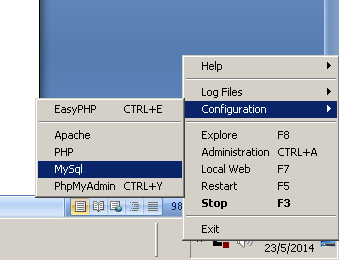
Remote Connect MYSQL server using php.

Image
How to remote Connect MYSQL server using local php. 1. First, you access the mysql using phpmyadmin or shell command. mysql –u root –h your.mysql.server.address –p password ps: The argument behind –u is username, -h is the hostname/host address and argument behind –p is the password. So substitute the respective argument. 2. You need to create user with % as domain and grant her access to the database. The usr is the username you want to name it. The yourdb.* you should change to your database name. CREATE USER ‘usr’@’%’ IDENTIFIED BY ‘some_pass’; GRANT ALL PRIVILEGES on yourdb.* TO ‘usr’@’%’ WITH GRANT OPTION; 3. Then you now need to edit the my.cnf, you can easy find the mysql config file if you are using easyphp. 4. After open the file then you need to set the bind-address = your.mysql.server.address and comment out the skip-networking field. 5. Restart your mysql. 6. MySQL is using the port 3306 so if you have firewall you shou...