Posts

Spanning Tree Protocol (STP)

Spanning tree protocol is a network protocol that is used to ensure a loop-free topology. The basic function of the STP is to select which port will be use if there are occurs in redundant link which act as backup if the active link fails.The inventor of the STP is called Radia Perman, which is a software designer and network engineer, How the STP works? Root Bridge(bridge and switch is same thing) --> switch with the lowest mac address become root bridge,if and only if the priority is same Elect Root Port (RP) --> root port is port on the non root bridge pointing back to root bridge depend on speed (higher speed == lower cost) and port id (lowest port id win) Elect Designated Port (DP) --> port at root bridge pointing toward non root bridge Elect Non-designated Port (NDP) --> port on non-root bridge pointing towards root bridge that is block automatic become standard port The switch will sent Bridge Protocol Data Units (BPDU) to nearby switch (default sent every...
Agent Architectures

An agent is a computer system that capable of flexible autonomous action. While Agent architecture is the model for software agents and intelligent control system. Basically there are 3 type of architecture which are: Symbolic/logical (Proactive) Reactive Hybrid Symbolic Architecuture Symbolic Reasoning Agent At the beginning, all the agents is designed were symbolic reasoning agents. It is the expressions that can propose to the agents to use the expression logical reasoning to decide what to do.  To build an agent, there are exist a classical approach which is to view the system as a particular type of knowledge-based system. This paradigm we called as symbolic AI, it contain the intelligent behavior can be generated in a system by giving that system a Symbolic representation of its : Environment Desired behavior Syntactically manipulating this representation Symbolic is an architecture that : contains explicitly represented, symbolic model...

Practical Reasoning

Practical reasoning is reasoning directed towards actions , which mean that it was the process to figuring out what to do. It weighing conflicting considerations for and against competing options, where relevant consideration are provided by what the agents desires/values/care about and what the agents believe. Example of practical reasoning: Mr Wong want go to Beijing, he think about the route to take to get to Beijing. He can use direct Beijing route which is faster and scenic route is longer but more enjoyable with less traffic. He in hurry but could probably arrive on time going either way. He eventually make a decision. This is the reasoning of Mr Wong goes through while deciding on what route to take is practical. He is deciding what to do. Differ from practical reasoning, theoretical reasoning is directed toward beliefs, which mean the process what conclude corresponding sense leads to belief and expectation. Example of Theoretical reasoning: At about the same time...

File transfer from android to linux

Android File transfer basically got two method or format which are Media device (MTP) and also for camera (PTP). However , the MTP is only suitable for windows or Mac computer, it was not compatible with the Linux. The PTP only allow you to transfer photos only but not others files. However you can let your ubuntu to support mtp by using the "mtpfs" or "jmtpfs". Below I will show step by step how to configure the MTP service in Ubuntu 14.04 LTS. First of all you need to install the mtp tools in linux, you can install by using the commands below. Open the terminal and type in the following 2 line. (ps:without the quote, and it may required you to key in your password) "sudo apt-get install libmtp-common mtp-tools libmtp-dev lilbmtp-runtime libmtp9" "sudo apt-get dist-upgrade" 2nd Step you have to edit the fuse.conf file. Fuse provide a secure method for non privileged users to create and mount their own file system implementation. =| You...

Tutorial to set environment path linux

This tutorial is for Linux Distro that using bash in terminal, in my case is Ubuntu. If you just set the PATH just using the "export" command  , it wont able to set it permanently and will disappear after you close the terminal or restart computer.So follow the procedure below to set the PATH permanently. STEP: EXAMPLE SETTING JAVA Jdk-x-x-x at =usr/local/jdk-x-x-x 1) Open the terminal. 2) Type in the command "cd ~" 3) gedit .bashrc 4) Put the command "export PATH=$PATH:/usr/local/jdk-x-x-x" at the bottom of the .bashrc 5) Save it and exit gedit. 6) then type in the command "source .bashrc" You can try type java inside the terminal. restart the terminal and try. =D hope it help.

Computer Agents

Image
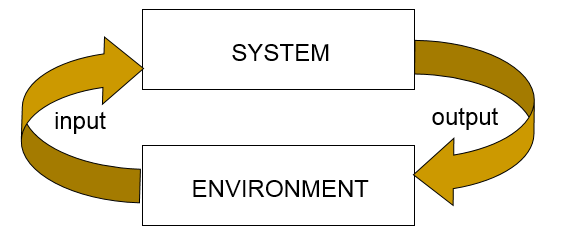
What is computer agents? A computer agent is a computer system that is capable of independent action on behalf of user or owner. Which mean that it able to figuring out what needs to be done to satisfy the design objectives rather than constantly being told.Which mean that the computer agent able to make decision by it own to achieve the design objective. What make computer agent to become agent is because their capable to a cting independently , exhibiting control over their internal state which another word to explain is autonomous . So Computer Agent is a computer system that is able to make action autonomously in some environment in order to meet its design objectives. Computer Agent There can be 2 kind of agent which are: Trivial (non-interesting) agents- Agents like thermostat that control heating system in houses. Intelligent agent-is a computer system that capable of flexible autonomous action in some environment.By flexible we mean: Reactive Pro-active ...

Eclipse JADE Plugin

Image
JAVA Agent DEvelopment Framework (JADE) JADE is know as the JAVA Agent DEvelopment which is a framework for computer agent for java language. It make the multi-agent system more simple through a middle-ware that is using the FIPA specification and include set of graphical tools to support debugging and deployment. The system that is based on the JADE could be distributed across machines even not the same Operating system and all the configuration could be done via a remote GUI. The JADE is using Java which the minimal system requirement is the Java JDK 5.0. JADE is a framework and it do not have any plugins for the eclipse but you can add JADE manually into the java project. All you need to do is let the jar file of jade add into the libraries and changes some default setting. The step are show below with picture on install JADE into eclipse. 1.Create a project with any name, then click next . 2. After click next, you will come to this page then you click the L ibraries...