Customize Windows Context Menu
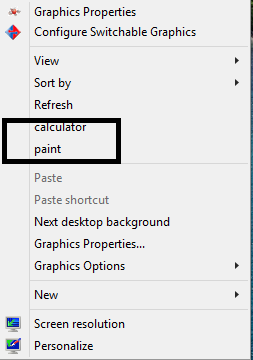
Customize Windows Context Menu Context menu can be normally 4 type which are: Option in All files context menu Option in folders context menu only Option in Drives context menu only Option in unknown files context menu You can customize the context menu by your-self just to follow the step below. How to modify the windows context menus ? First of all , you are using windows OS. =| Second is you find out which type of context menu you want to customize. The types as I mention above and do the corresponding modification. HKEY_CLASSES_ROOT\* (option in All files context menu) HKEY_CLASSES_ROOT\Directory (option in folders context menu only) HKEY_CLASSES_ROOT\Drive (option in Drives context menu only) HKEY_CLASSES_ROOT\Unknown (option in unknown files context menu) Third, is open registry. =| "Win + R" -> type in "regedit" without the quotes. Fourth, find the corresponding key(each of the directory is what we call key). A...
