Posts

Showing posts with the label windows

Retrieve password from Jetbrain IDE (Datagrip) Windows OS only

Image
 If you are using the IDE from JetBrains like PyCharm, DataGrip, WebStorm but you forgot the password you still able to retrieve back by using the KeePass. The Jetbrain is using the keepass to store the password. I will skip the download and install step of KeePass and direct go to the important part. First Open the IDE according to the password you want to retrieve, then click File menu -> Settings. Search for password. If radio button selected is the “Do not save, forgot password after restart” then you may leave now as there is no password saved. Input the password you want which will use it later. After you set the password, then you can navigate to the path show at the Database label file path. Then you open the file c.kdbx at the path as mentioned above. Check the master password and input the password you set just now. Then the list of passwords saved entry is show below. Then you could just right click the entry and New dialog box will show, then you just need to c...
Disable Shutdown button

Image
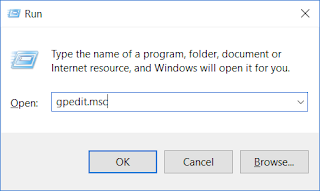
I accidentally shut down the remote server, so  I was looking for a way to disable the remote user to shutdown. There is a method to prevent the user to shutdown according to user and access but I do not recommend it. Below is the method to disable shutdown: 1)  (Win+ R) Run "gpedit.msc" 2) go to User configuration => Administrator template -> Start Menu and Taskbar 3) Find "Remove and Prevent access to shutdown, Restart ...." and double click 4) You will see the setting is not configure 5) all you need to do is click enable and apply. Done That simple. you should not able to see shutdown and restart. However, you can do it with command prompt or set the setting back to not configure. PS: shutdown -s now Feel free to leave a comment below if you have a better solution! Thank you ~~

Step to Configure Php and Apache at windows

Image
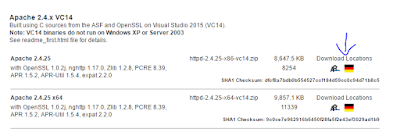
Configure PHP and Apache windows 10  This configuration guide is using Php 5.6 and Apache 2.4 for 32 bit on windows 10x64. I do this installation because of Laravel PHP framework but this guide won't touch about the Laravel. There some binaries that you might need to take care but I not gonna touch that at here either. If any question you can leave your comment below. 1) DOWNLOAD AND INSTALL APACHE  First, you will need to download apache, and I gonna use Apache Haus as an example. However, you can use others options here . after you finish download then extract it. After that go to  httpd-2.4.25-x86-vc14\Apache24\conf and open the  httpd.conf . (Assume you an expert ... else go leave here and download XAMPP or Easyphp) Then find "Server root" Define SRVROOT "D:\Program\httpd-2.4.25-x86-vc14\Apache24" ServerRoot "${SRVROOT}" Replace the  "D:\Program\httpd-2.4.25-x86-vc14\Apache24"   to your director of the apache...

Customize Windows Context Menu

Image
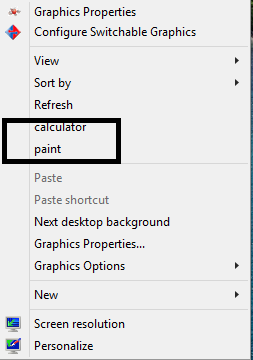
Customize Windows Context Menu Context menu can be normally 4 type which are: Option in All files context menu Option in folders context menu only Option in Drives context menu only Option in unknown files context menu You can customize the context menu by your-self just to follow the step below. How to modify the windows context menus ? First of all , you are using windows OS. =|  Second is you find out which type of context menu you want to customize. The types as I mention above and do the corresponding modification. HKEY_CLASSES_ROOT\*   (option in All files context menu) HKEY_CLASSES_ROOT\Directory (option in folders context menu only) HKEY_CLASSES_ROOT\Drive (option in Drives context menu only) HKEY_CLASSES_ROOT\Unknown (option in unknown files context menu) Third, is open registry. =| "Win + R" -> type in "regedit" without the quotes. Fourth, find the corresponding key(each of the directory is what we call key). A...

Remove Ubuntu Startup option

Image
Recently I have installed the windows 8.1 dual boot with Ubuntu. However , the Ubuntu has can't be start up. However when I open My computer, it will still have the start up option . The first thought was uninstall the Ubuntu (Ps: I use wubi installer to install Ubuntu) . After Uninstall the Ubuntu, I restart the computer and found that the startup option of Ubuntu still at there. Ok , let skip the story part to the solution: Run CMD.exe as Administrator (UAC) bcdedit bcdedit/delete {identifier} Example : bcdedit/delete {347989da-7c6c-11e3-bece-001e3123bbd6} In my case is using chinese word ... so in english word should be is identifier. Thank for reading my blogs.Leave comment if you have any others suggestion to remove boot option