Posts

Showing posts with the label startup

Tomcat Debug Cannot Startup
Image
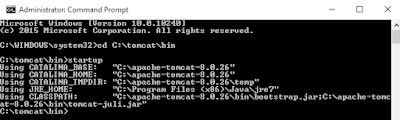
Today I download the Windows binary version of the Apache Tomcat , after I follow the guide to install the tomcat , when I using the command line startup.bat the tomcat, a command prompt out then close automatically. while the command prompt only show this. Another command prompt is come out but exit automatically and the Apache tomcat Server is not start which test it using the browser key in localhost:8080, but turns out is connection timeout. I look through the startup.bat and found that it call catalina.bat with no arguments. The catalina.bat is too long , very lazy to look at it. I try to google it the way to stop the pop up command prompt close. Ok , no more story straight to the solution: 1) Type in "catalina.bat run" at the bin directory of your apache tomcat folder.(or in baby step type in "C:\tomcat\bin\catalina.bat run" replace the tomcat with the name of your Apache directory) 2) Then it come out the logs cannot create logs  org.a...

Remove Ubuntu Startup option

Image
Recently I have installed the windows 8.1 dual boot with Ubuntu. However , the Ubuntu has can't be start up. However when I open My computer, it will still have the start up option . The first thought was uninstall the Ubuntu (Ps: I use wubi installer to install Ubuntu) . After Uninstall the Ubuntu, I restart the computer and found that the startup option of Ubuntu still at there. Ok , let skip the story part to the solution: Run CMD.exe as Administrator (UAC) bcdedit bcdedit/delete {identifier} Example : bcdedit/delete {347989da-7c6c-11e3-bece-001e3123bbd6} In my case is using chinese word ... so in english word should be is identifier. Thank for reading my blogs.Leave comment if you have any others suggestion to remove boot option

Remove startup Program

Image
Do you need use 4 or more minute to wait the Window startup? This mean you need to remove the programs from Startup. Here is the few step to clear the numbers of programs when you start up: Window XP, Window Vista & Window 7 Press start ,then click the run.(Window Vista & Window 7 user can just key in the msconfig into the search box) key in msconfig and click enter. click the starup tab at the top of the frame. You can untick the programs that you don't want it start with the window. Related Articles: 3 basic way to speed up computer Advance way to speed up computer Speed up computer using virtual memory