Posts

Showing posts with the label setting

Remote Connect MYSQL server using php.
Image
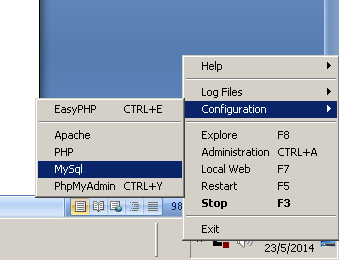
How to remote Connect MYSQL server using local php. 1. First, you access the mysql using phpmyadmin or shell command. mysql –u root –h your.mysql.server.address –p password ps: The argument behind –u is username, -h is the hostname/host address and argument behind –p is the password. So substitute the respective argument. 2. You need to create user with % as domain and grant her access to the database. The usr is the username you want to name it. The yourdb.* you should change to your database name. CREATE USER ‘usr’@’%’ IDENTIFIED BY ‘some_pass’; GRANT ALL PRIVILEGES on yourdb.* TO ‘usr’@’%’ WITH GRANT OPTION; 3. Then you now need to edit the my.cnf, you can easy find the mysql config file if you are using easyphp. 4. After open the file then you need to set the bind-address = your.mysql.server.address and comment out the skip-networking field. 5. Restart your mysql. 6. MySQL is using the port 3306 so if you have firewall you shou...
Oracle SQL Developer date format

Image
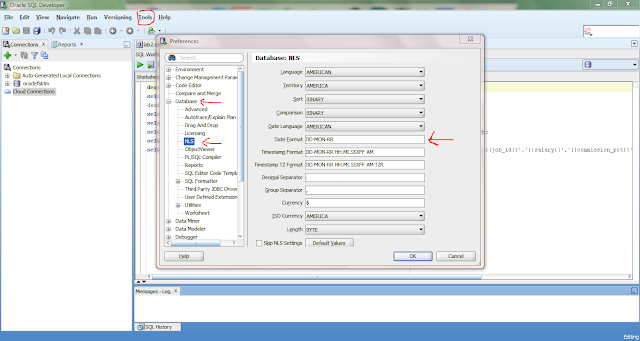
Recently, I use the SQL statement like this   INSERT INTO Table_Name VALUES(12-JUN-97);  But it give me a error description about the missing column , and error code of . My syntax/statements are1 not short as above , but since others data type is VARCHAR2 and NUMBER thus I can quickly identify the problem come from the DATE . Then, I Google and found that many others people also face the problem on the same error code, may be your error is not similar with me but I would like to share solution on the problem I have faced for almost half hour that can be solve in few minute. Hope that people that have same problem like me can solve it once see my post. The error can be easily fixed by adding '12-JUN-97 '  into the date instead of 12-JUN-97 . Another problem face by my friend is the date format of the ORACLE SQL DEVELOPER is not as the 12-JUN-97. So to change the time format you can follow the instruction below and have ...

Setting firefox address bar google search

Image
How to setting Firefox address bar to perform Google search? It was easy to Google search using the address bar, all you need to do is just follow the simple step First type in " about:config " in the url /address bar of Firefox. Then type in keyword in the text field and press enter ! Find keyword.URL and (double click or right click and modify) set the value to: https://www.google.com/webhp?hl=en&tab=ww&authuser=0#hl=en&authuser=0&output=search&sclient=psy-ab&q= Done !