Posts

Showing posts with the label PHP

Step to Configure Php and Apache at windows
Image
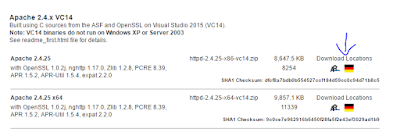
Configure PHP and Apache windows 10  This configuration guide is using Php 5.6 and Apache 2.4 for 32 bit on windows 10x64. I do this installation because of Laravel PHP framework but this guide won't touch about the Laravel. There some binaries that you might need to take care but I not gonna touch that at here either. If any question you can leave your comment below. 1) DOWNLOAD AND INSTALL APACHE  First, you will need to download apache, and I gonna use Apache Haus as an example. However, you can use others options here . after you finish download then extract it. After that go to  httpd-2.4.25-x86-vc14\Apache24\conf and open the  httpd.conf . (Assume you an expert ... else go leave here and download XAMPP or Easyphp) Then find "Server root" Define SRVROOT "D:\Program\httpd-2.4.25-x86-vc14\Apache24" ServerRoot "${SRVROOT}" Replace the  "D:\Program\httpd-2.4.25-x86-vc14\Apache24"   to your director of the apache...
Remote Connect MYSQL server using php.

Image
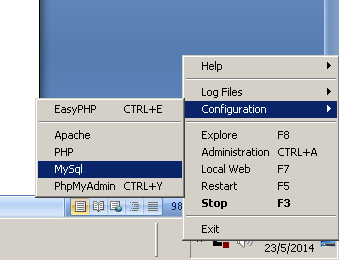
How to remote Connect MYSQL server using local php. 1. First, you access the mysql using phpmyadmin or shell command. mysql –u root –h your.mysql.server.address –p password ps: The argument behind –u is username, -h is the hostname/host address and argument behind –p is the password. So substitute the respective argument. 2. You need to create user with % as domain and grant her access to the database. The usr is the username you want to name it. The yourdb.* you should change to your database name. CREATE USER ‘usr’@’%’ IDENTIFIED BY ‘some_pass’; GRANT ALL PRIVILEGES on yourdb.* TO ‘usr’@’%’ WITH GRANT OPTION; 3. Then you now need to edit the my.cnf, you can easy find the mysql config file if you are using easyphp. 4. After open the file then you need to set the bind-address = your.mysql.server.address and comment out the skip-networking field. 5. Restart your mysql. 6. MySQL is using the port 3306 so if you have firewall you shou...

Step to become a great web developer

Image
There are many computer language you need to know to become a web developer on the web. The first language you should learn is  H yper  T ext  M arkup  L anguage ( HTML) Here is the HTML resources: W3school HTML Html dog The second thing you need to learn is Cascading Style Sheet (CSS) If HTML is tell what is your structure of your house and the size of your house then CSS is like wallpaper for your room,what tree you have plant and others! The W3school also provide a good learning tutorial for you !You can go and check the CSS . Here is a good tool you can use it for your website. Anothers programming language you need to learn is JavaScript! JavaScript is a web browser scripting language, all the action will execute within the web Browser. Recently Google has lunching a new language call Dart !It was the programming language for the JavaScript ! With the Dart platform, you can write code that runs on server...