Posts

Showing posts with the label iphone

More iPhone finger tips

Image
How to create a iphone app We’ll give you the actual code that was used to create 6 of our very own apps. With this you will see what source code is supposed to look like and give you a good foundation for creating your own Apps. Don’t worry about deciphering the code. Just tell your App Developer your idea and send them the code to work from. This will save you time and development costs, making your projects even more low cost. We also include step-by-step instructions on how to tweak the code yourself should you choose to do so. CREATE  IPHONE APP PHoToS Load your favorite photos onto iPhone from your computer using iTunes or use the built-in camera to take pictures. Tap Photos to see your pictures. Flick right or left to move between images.  Double-tap or pinch to zoom.  Tap once to bring up the onscreen controls.  Tap the Action button to send a photo in an MMS or email.  You can also use a photo as wallpaper,assign it to a contac...
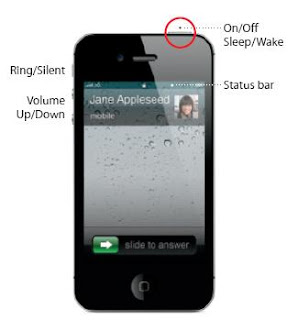
Iphone 4 finger tips

Image
Here provide IPhone finger tips: The other function of on/off button. Iphone on/off button Press the on/off button once ,this can turn off the screen but still allow you to receive a phone call. To silence a income call press once To send a call into a voicemail,by press the button twice.   Function of Home button Iphone Home button When using an app, press the Home button to close it and return to its Home screen. To go quickly to the main Home screen, press the Home button from any other Homescreen.  From the Lock screen, double-click the Home button to bring up iPod controls.   Create folders . Organize apps.Touch and hold any icon until it starts to jiggle. Then drag one icon onto another to create a folder. Folders are automatically named by category, or you can rename them.  You can customize your Home screen by dragging icons and folders to different positions and different  screens. When you’re fi nished, just press the Home button...